Every contact in one place.
Every warm intro within reach.
Flare is an AI contact manager that runs inside your own Claude. It turns your inbox, calendar and contact lists into one organized network you can act on.
It stands on its own, and you control your data: no Flare server, nothing shared unless you choose.
For anyone who wants their contacts collected and in order. Especially good for founders, whose next investor, customer or hire is usually one warm intro away.
See what Flare does ↓Save your LinkedIn network while it still has the useful parts
You keep your connections; only the spreadsheet gets thinner. Grab the full version now and Flare will use it when your invite arrives.
- STEP 1Make your last connectionsAccept pending invitations and send requests to people you've met lately. Anyone you add after you export won't be in the file.
- STEP 2Open your data settingsOn a computer, open LinkedIn's Get a copy of your data page. LinkedIn's own note at the bottom confirms the December change.
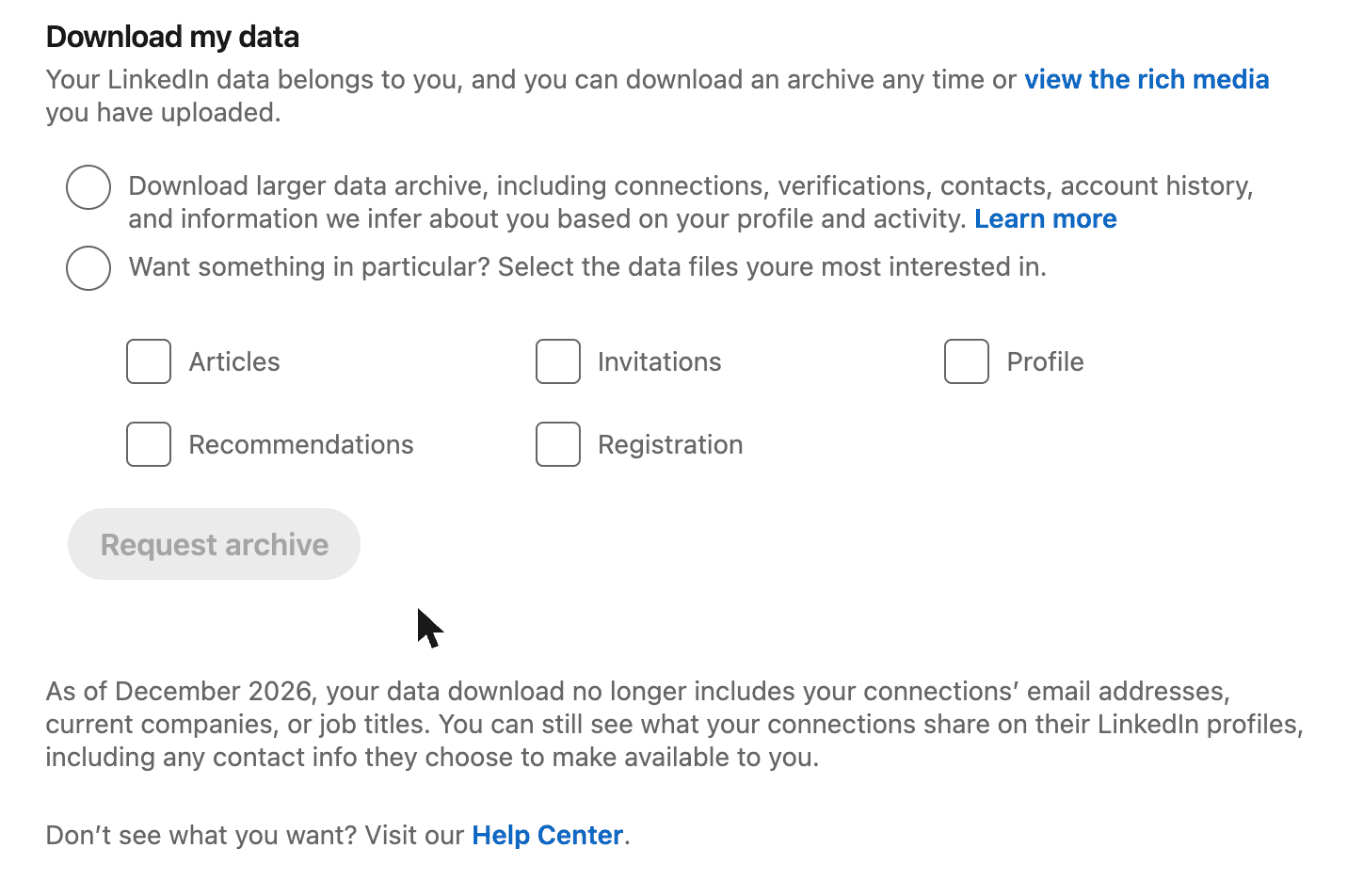
- STEP 3Request the archiveOn the same page, choose the first option, "Download larger data archive, including connections", then click Request archive. LinkedIn says it will be ready in about 24 hours.
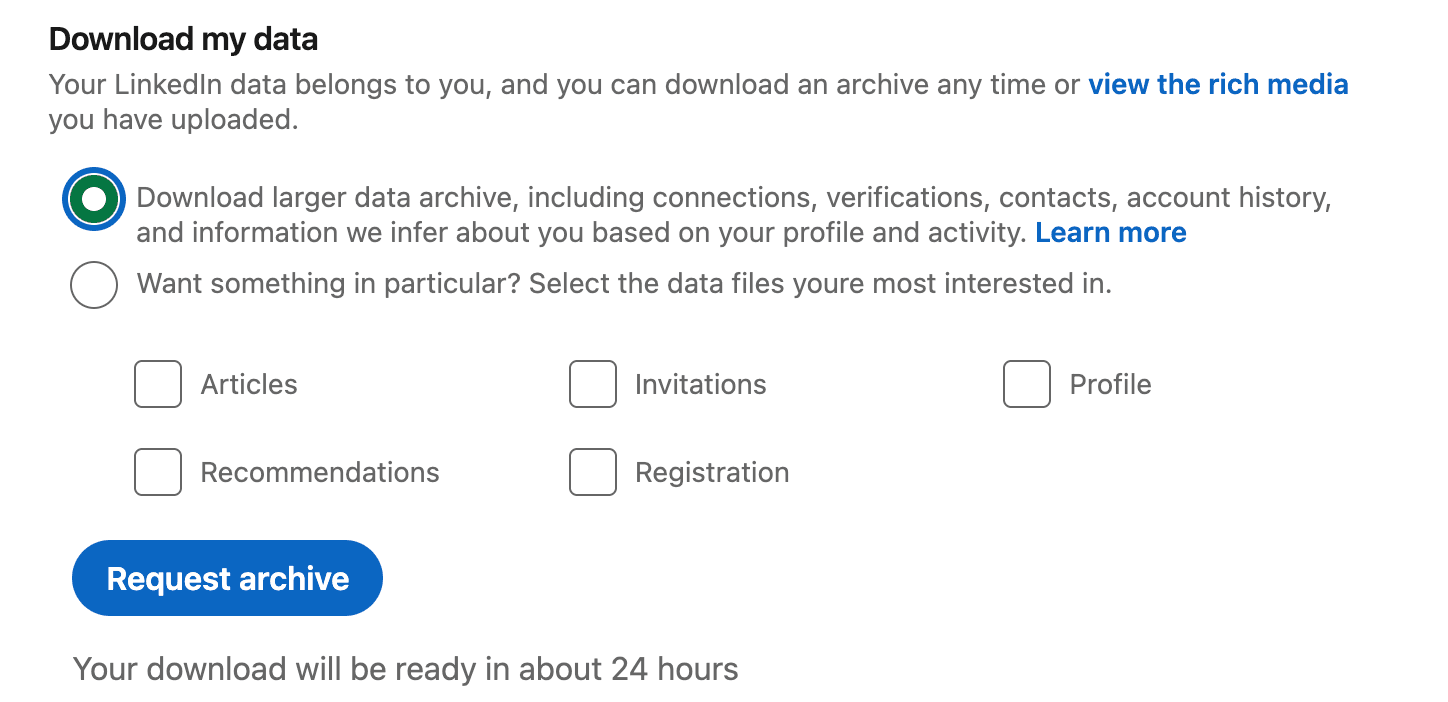
- STEP 4Download and keep itLinkedIn emails you when it's ready. Download the ZIP soon (the link expires) and save Connections.csv somewhere safe.
Your network, finally in order
All your contacts, collected
Flare pulls people from Gmail or Outlook, your calendar, your LinkedIn export and any other list you bring (a phone export, a CRM, a spreadsheet) into one list, merges the duplicates and keeps who they are and how you know them up to date.
Know who you're close to
Gravity scores every relationship from how often and how recently you both write and meet, so your inner circle reflects reality, not whoever emailed last.
Walk into every meeting ready
A short brief for the people on today's calendar: how you know them, when you last talked, and what is worth bringing up.
Reach out before ties go cold
Flare flags the people worth a note this week and drafts the email, so a warm relationship stays warm.
Ask your network anything
"Who do I know at Stripe?" Flare answers from your real relationships and tells you who can make the intro.
Private by design
Flare runs in your own Claude account. It reads headers, never email bodies, and there is no Flare server holding your contacts.

A family of connected apps, contacts and networks.
Connect Flare when you want more: Orbit puts your people to work for the company you are building, and Galaxy links your network with the people you trust, so no founder has to cold-email someone two friendly steps away.
Flare
Your private map of who you know and how well.
Orbit
Your people inside Lev, working for the company you are building: investors, customers, hires and advisors.
Galaxy
With consent, warm paths through your team's and cohort's networks, without anyone handing over their contacts.
Lev is the AI co-founder for founders.
Lev takes you from idea to company on one canvas, step by step. Along the way it shows you what to improve next and drafts what you need: go-to-market plans, prospect lists, landing pages and product specs.
- See how Lev works ↗The canvas and the process
- Lev in Claude ↗Connect Claude to your Lev project
- Venture Graph ↗Every VC firm, from SEC filings
- Lev Learn ↗Startup concepts, explained
Be one of the first to try it.
Early testers get daily builds, a direct line to the team, and credit in the release notes for the bugs they find.